Search Close Search
Search Close Search
Page Menu

UMass Chan CMS Blog

Hiding pages from search engines and menus on your site

Thursday, January 15, 2026
|

There are times when you want a page to exist on your site but not be discoverable from search engines or listed in any menus. It may be a page that you only send a link via email or used in a campaign eslewhere, but it will never exist on your site's menus or as a link from any page.

Here are some way to keep your pages from being listed in a search engine:

  1. Hide from the site's search engine sitemap - make sure it does get included on your site's sitemp
    Sitemaps are crawled by the search engines to discover all the pages on your site
    •  Edit your page in all properties view
    • On the Metadate tab
      • uncheck Enable in SEO
  2. Set to exclude from search engines
    • Edit your page in all properties view
    • On the Metadate tab
      • add a check to NO INDEX, this will tell the search engines to exclude this page from their catalog. 

        notes:
        • if a page already exists in a search engines results, this can take a while to remove from their catalog as it depends on when this page is crawled again.
        • if you need a page removed immediately, alert the CMS team to have them add this page to the robots.txt file and remove the page via Google and Bing admin tools

          support ticket
    • publish the page
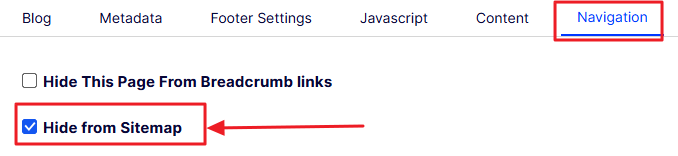
  3. Hide from site index page
    If your site contains a page listing all of your site's pages (site index page -EXAMPLE), you will want to ensure your page is not linked on this page
    • Edit your page in all properties view
    • On the Navigation tab,
      • select the Hide from Sitemap property 
    • Publish your page
  4. Exclude from any menus
    You will want to make sure this page is not discoverable in any menus, but if it is, the property your checked for NO INDEX will keep it from getting included in search engines
    • Edit your page in all properties view
    • In the gray area at the top,
      • uncheck the property: Display in navigation
    • Publish your page
Blog Topic: